
Remote desktop solutions have become essential for modern businesses, developers, traders, and automation professionals. Among global locations, the United States remains one of the most preferred regions for hosting due to its powerful infrastructure and reliable connectivity. This is why demand for USA RDP with Admin Access continues to grow.
Unlike standard RDP accounts with limited permissions, admin-enabled RDP environments provide full system control. Whether you want to buy USA admin RDP, are looking for cheap USA admin RDP, or need clarity on how USA RDP admin access works, this guide explains everything clearly and practically.
Table of Contents
What Is USA RDP with Admin Access?
USA RDP with admin access is a Windows-based remote desktop hosted on a US server that includes full administrator privileges. This allows users to install software, modify system settings, manage users, and run advanced applications without restrictions.
Admin access is especially important for professional workloads where customization, automation, or long-running processes are required. Compared to shared or restricted RDPs, admin-enabled RDP offers flexibility and complete operational control.
Why Choose USA-Based RDP Servers?
SA-based RDP servers are widely preferred due to the United States’ advanced hosting infrastructure and global network reach. The country hosts some of the world’s most modern data centers, supported by high-speed backbone networks and optimized routing that delivers consistently low latency across North America and strong connectivity to Europe and Asia.
Hosting RDP servers in the USA ensures reliable performance for resource-intensive applications such as trading platforms, automation tools, and long-running Windows workloads. The stable network environment minimizes disruptions, making USA RDP ideal for businesses and professionals who depend on uninterrupted remote access.
Another key advantage is compatibility. Many global platforms, financial tools, and SaaS applications are optimized for US-based environments, allowing smoother integrations and better performance. USA hosting also supports flexible scaling, enabling users to upgrade resources as workloads grow.
DigiRDP stands out as one of the leading providers of USA-based RDP solutions, delivering admin-enabled environments built on enterprise-grade infrastructure. With a focus on uptime, security, and performance consistency, DigiRDP ensures users receive reliable remote desktop access suitable for professional and business-critical operations.
Features of USA RDP with Admin Access
Admin-enabled RDP environments come with features designed for professional use.
- Full administrator privileges
- Ability to install and configure software
- Dedicated system resources
- High-speed SSD or NVMe storage
- Stable network connectivity
- 24/7 availability for continuous workloads
These features make buying USA RDP with admin access suitable for both short-term projects and long-term professional operations.
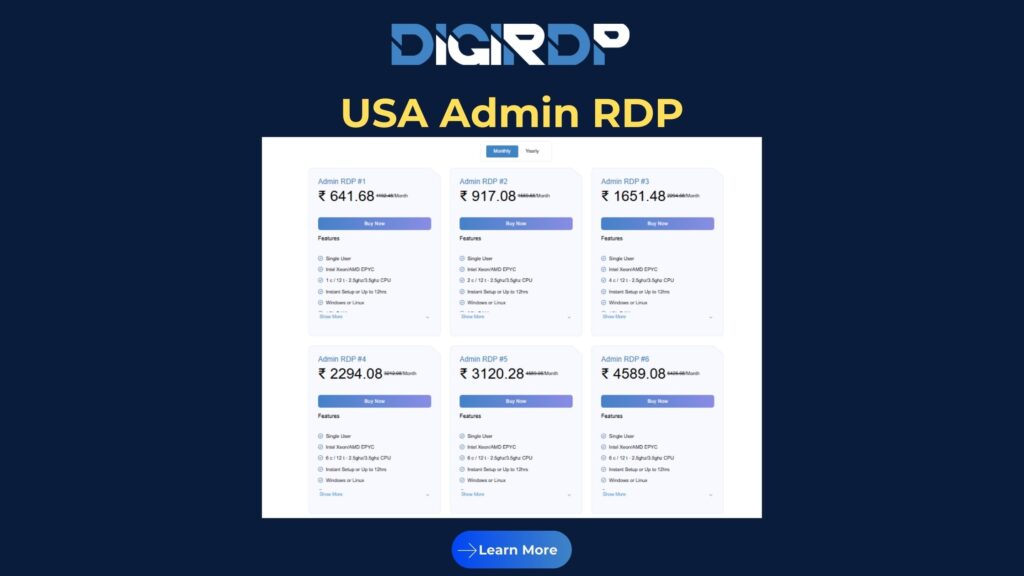
USA RDP with Admin Access Pricing Explained
Pricing for USA admin RDP depends on server resources, storage type, bandwidth, and usage duration. Entry-level plans are often marketed as USA admin RDP, suitable for light workloads and testing environments.
Higher-tier plans offer more CPU power, RAM, and faster storage, making them ideal for traders, developers, and agencies running multiple applications simultaneously. When evaluating price, performance stability and security should be considered alongside cost.
Who Should Buy?
USA admin RDP is ideal for users who need unrestricted control over a remote Windows environment.
Developers use admin RDP to deploy and test applications. Traders rely on it to run bots and platforms continuously. Digital marketers and automation specialists use admin access to manage tools and workflows without local hardware limitations.
Best Suited For
- Developers and software testers
- Forex and crypto traders
- Automation and bot-based workflows
- Digital marketing tools
- Long-running Windows applications
Not Ideal For
- Casual browsing or basic usage
- Users without technical experience
- Tasks that do not require system changes
Real-World Use Cases (Comparison)
| Use Case | How USA Admin RDP Is Used | Why Admin Access Matters |
|---|---|---|
| Software Development | App deployment and testing | Full software installation and debugging |
| Trading & Automation | Running bots 24/7 | Stable uptime and system control |
| Digital Marketing | Managing automation tools | Multi-tool installation and configuration |
| Agencies | Handling multiple client setups | Centralized management |
| Data Processing | Running scripts and tools | Performance tuning and background execution |
Performance, Uptime, and Security Advantages
Performance
USA RDP servers deliver consistent performance through dedicated resources and modern hardware. Admin access allows system-level optimization for demanding workloads.
Uptime
US data centers are built with redundant power, cooling, and network paths. Continuous monitoring ensures reliable uptime for long-running tasks.
Security
Admin RDP environments include isolated systems, firewall protection, and full control over security configurations. Proper setup ensures safe remote access for professional use.
How to Buy USA RDP with Admin Access
Start by identifying your workload requirements, including CPU, RAM, and storage needs. Light tasks may work with USA admin RDP plans, while professional workloads benefit from higher-tier configurations.
DigiRDP offers a range of USA-based admin RDP solutions designed for performance, security, and scalability, making it easier to choose a plan that fits your use case.
Conclusion
Choosing USA RDP with Admin Access is the right decision for users who need full control, flexibility, and reliable performance in a remote Windows environment. From USA admin RDP plans to high-performance configurations, the right solution depends on your workload and long-term goals.
With secure infrastructure, modern hardware, and scalable options, DigiRDP enables professionals to work efficiently using USA-based admin RDP solutions.
1. What is USA RDP with Admin Access?
USA RDP with Admin Access is a Windows-based remote desktop hosted in the United States that provides full administrator privileges for complete system control.
2. Is it safe to buy USA RDP with admin access?
Yes, when secured with strong passwords, firewall rules, and regular updates, admin RDP environments are safe for professional workloads.
3. Are cheap USA admin RDP plans reliable?
USA admin RDP plans are suitable for light tasks and testing, while long-running or resource-intensive workloads perform better on higher-tier plans.
4. Who should use USA RDP admin access?
Developers, traders, digital marketers, and automation professionals benefit the most from USA admin RDP due to its flexibility and uninterrupted performance.
5. Why choose DigiRDP for USA RDP with admin access?
DigiRDP offers secure, high-uptime USA-based admin RDP solutions built on modern infrastructure, making it a reliable choice for professional and business use.
Explore More About USA RDP with Admin Access
For readers who want a deeper understanding of USA-based RDP solutions with full administrative control, DigiRDP maintains a regularly updated knowledge hub curated by experienced cloud and server professionals. The content focuses on real-world performance optimization, secure admin-level configurations, and practical usage scenarios across USA-hosted RDP environments.
By exploring detailed articles on USA RDP architecture, best practices for admin access, and proven deployment strategies on the official DigiRDP Blog, readers can stay informed about evolving remote desktop standards and infrastructure best practices shaping 2026 and beyond.